Documentation › Models
Models
Which model plans, which acts, which takes over when a step is hard — and where those models run.
Roles
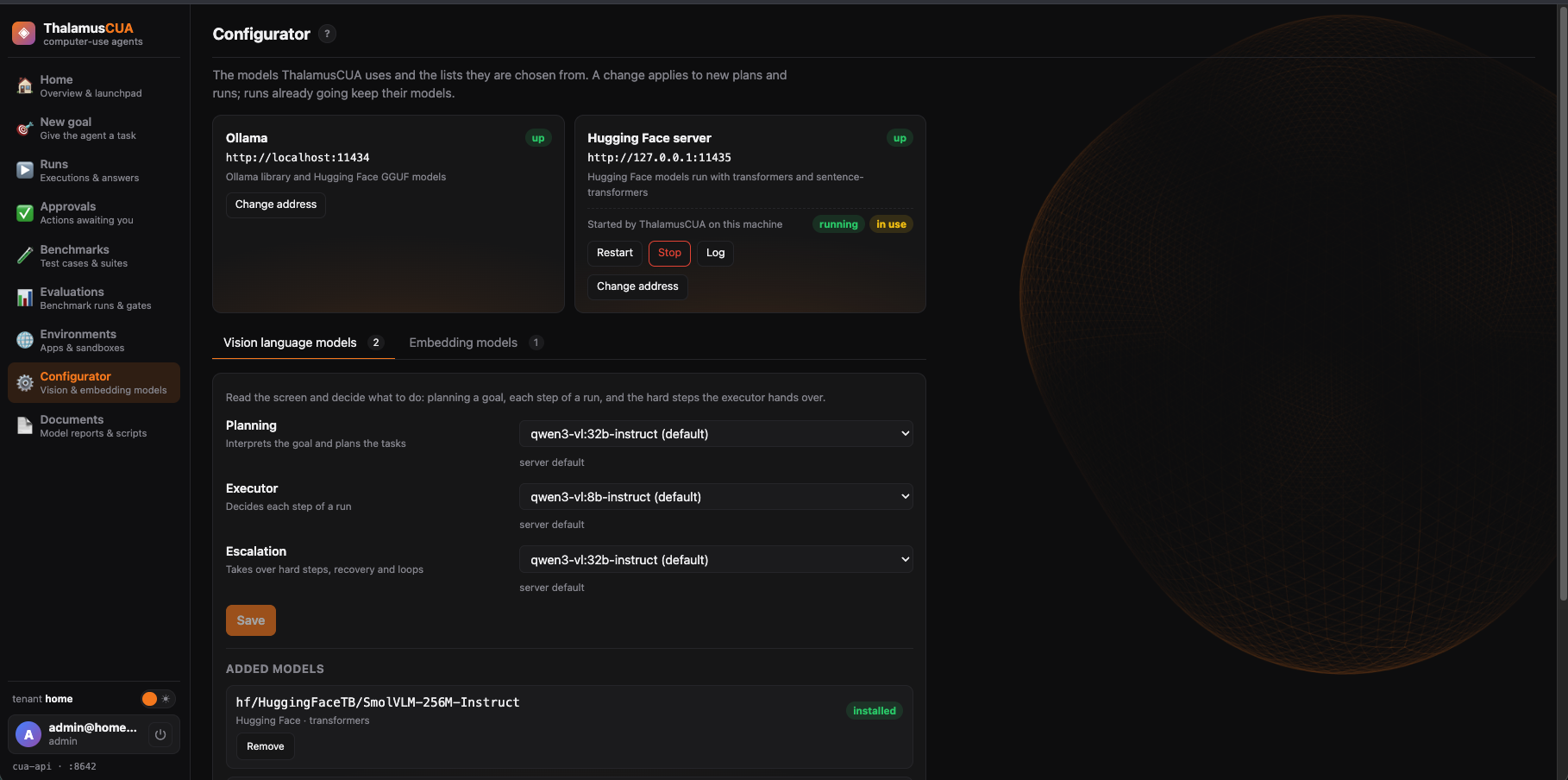
Console → ConfiguratorThe agent sees the screen through vision models that run inside your instance. On the Configurator page, admins choose a model for each role:
| Role | Kind | What it does |
|---|---|---|
| Planning | Vision | Interprets the goal and plans the tasks. |
| Executor | Vision | Decides each step of a run. |
| Escalation | Vision | Takes over hard steps, recovery and loops. |
| Primary | Embedding | Embeds application knowledge for search. |
| Fallback | Embedding | Used when the primary is unavailable. |
Built in: qwen3-vl:8b, qwen3-vl:32b and their -instruct
versions for vision, plus two computer-use models, hf/beipo-ai/NorthCUA-Nano and
hf.co/bartowski/beipo-ai_NorthCUA-Mini-GGUF:Q4_K_M (see
measured results); bge-m3 and nomic-embed-text
for embeddings. Prefer the -instruct vision models: the thinking ones can spend
minutes on one step. A selection applies to new plans and runs; runs already going keep their
models.
Model servers
Two kinds of model server, each with a card on the Configurator showing whether it is up:
- Ollama — runs most models, including Hugging Face GGUF models named
hf.co/<org>/<repo>[:quant]. - The Hugging Face server — runs
hf/<org>/<repo>models (transformers vision models and sentence-transformers embeddings). It speaks Ollama’s API, so the agent uses its models unchanged.
Both run inside your instance and are set up by Thalamus. Change address on a card tests and saves a new address for every tenant; the agent picks it up within 15 seconds.
Letting ThalamusCUA run the Hugging Face server
Choose an hf/ model when no Hugging Face server answers, and the Configurator offers
to start one on the server that runs your instance. ThalamusCUA then keeps it running — across API restarts — until
an admin presses Stop on its card (which also has
Restart and its Log). The first start installs its
environment and can take several minutes. It uses the GPU where it can, keeps two models loaded at
most, and unloads one after 30 minutes unused.
Adding and removing models
Add a model by name; it downloads on its server and can be chosen for a role once installed.
Removing one you added takes it off the list (an hf/ model can also have its files
deleted). A model a role uses, or one still downloading, can’t be removed.
Comparing models: measured results
Configurator note · Console → DocumentsA model that has been measured shows its results as soon as you pick it for a role, before you save: a table comparing it with the current executor, what the numbers say, a recommendation, and a link to the full report on the Documents page, with its summary and raw results.
The first evaluation (2026-11-10, a Mac Studio with an Apple M1 Ultra and 64 GB, no CUDA) compared the two NorthCUA computer-use models with the current executor:
| Model | How it runs | Calibration | Benchmark | Average step | First load |
|---|---|---|---|---|---|
| qwen3-vl:8b-instruct (current executor) | Ollama | 8/12 | 6/10 | 1.1 s | 4.6 s |
| NorthCUA-Nano 9B | Hugging Face server, bf16 | 10/12 | 5/10 | 15.7 s | 60 s |
| NorthCUA-Mini 35B-A3B, thinking off | Ollama, Q4_K_M | 8/12 | 3/10 (5/10 on a second run) | 1.4 s | 3.9 s |
- Calibration asks the model to point at 12 known targets on a 0–1000 grid; 11 of 12 is a pass, and none passed. Benchmark is 10 read-only tasks on the fixture site, so a difference of one or two tasks is within run-to-run noise.
- NorthCUA-Nano points most accurately, but its linear-attention layers have fast kernels only for NVIDIA GPUs; on a Mac each step takes about 16 s. It suits instances on CUDA hardware.
- NorthCUA-Mini is about 11 times faster than Nano (3B of its parameters are active per step) but no more accurate here, and sometimes answers in pixels instead of the grid. The full model is 70 GB, so a 4-bit build runs on Ollama.
- Both were trained on NorthCUA’s own harness and action format; ThalamusCUA asks for its own, which is part of why they score below their published numbers.
The recommendation from that evaluation: keep qwen3-vl:8b-instruct as the executor.
New measurements
Thalamus measures models — calibration on a 12-target page, ten read-only tasks, and the time a step takes — and publishes each evaluation with ThalamusCUA. A new evaluation appears on the Documents page with its report, summary, raw results and the scripts that produced it, and its models get the note on the Configurator. To have a model measured, contact Thalamus support.